Getting started
Qyasy is where your organisation keeps its KPIs, the values entered for them, and the objectives they serve. This page takes you from a new account to your first dashboard.
Create your company account
- Open Create account.
- Enter your first and last name and your work email.
- Enter your company domain: the short name that identifies your company in Qyasy, for example
alnoor. Use lowercase letters, numbers and hyphens. - Choose a password, confirm it, and choose Create account. Your free trial starts on the Starter plan, with no credit card.
You are the owner of the company. The owner can manage billing, company settings and every user.
Sign in
Open Sign in and enter your email and password. If your company requires two-step sign-in, you also enter the six-digit code from your authenticator app (see Security).
Find your way around
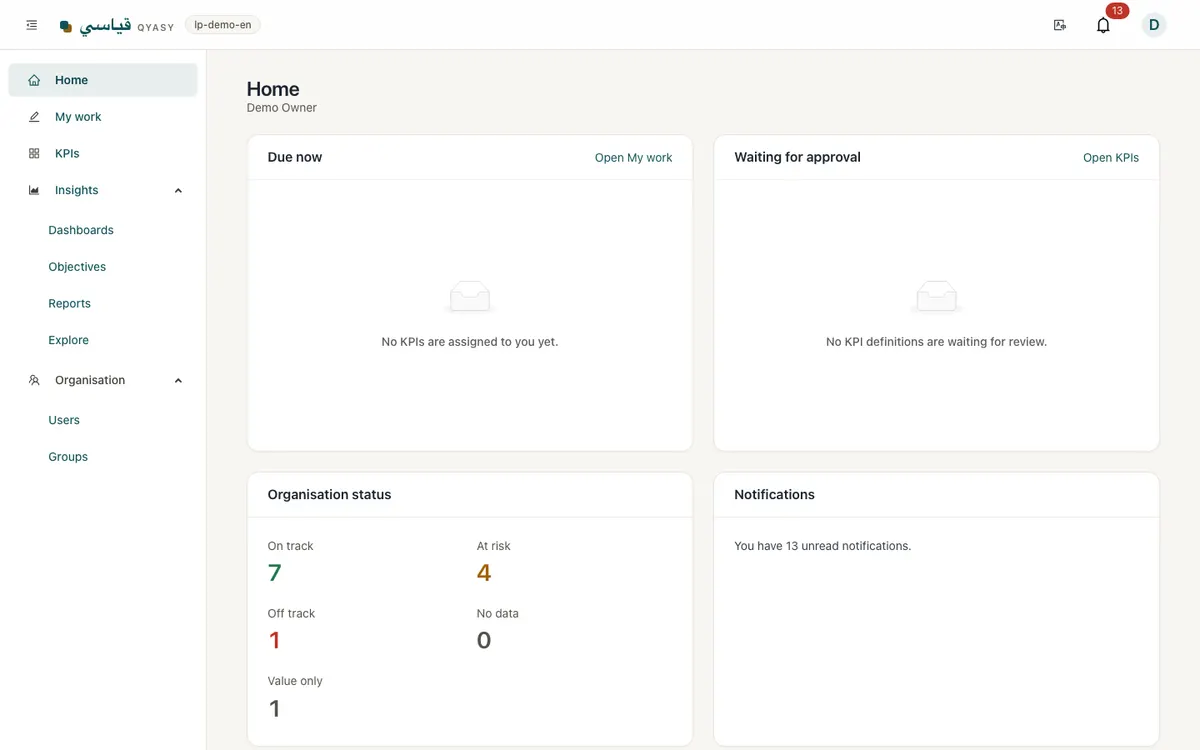
- Home shows what needs your attention: values due, your open actions and KPIs that slipped.
- My work is where you enter values for the KPIs you own.
- KPIs lists every KPI you can see, with its status.
- Insights holds Dashboards, Objectives, Reports and Explore.
- Organisation holds Users and Groups (for owners and admins).
- The settings menu (your name, top corner) holds your profile, password, notifications and company settings.
The language switch in the top bar changes between Arabic and English. Each person keeps their own choice.
Your first ten minutes
- Add two or three KPIs, or pick them from the KPI library.
- Enter last month's values in My work (Entering values).
- Create a dashboard and add a chart for each KPI (Dashboards).
- Invite the people who own the other KPIs (Users, roles and groups).
Install Qyasy on your phone
Qyasy works in any modern browser. To use it like an app:
- iPhone (Safari): tap Share, then Add to Home Screen.
- Android (Chrome): open the menu, then Install app.
The installed app can keep values you enter while offline and sends them when the connection is back.
Ready to make performance clear to everyone?
Start free trial